 on August 7, 2026
Rental Property Maintenance Software
on August 7, 2026
Rental Property Maintenance Software If you run a rental portfolio or oversee a property maintenance team, the pattern is familiar. Technicians fall behind, work late, and carry more open tickets than they can reasonably close. When a team is stretched that thin, adding people looks like the obvious answer. Most of the time the work is already there to be done well, and it is landing unevenly. The schedule is what decides who drowns and who idles.
Technician scheduling software assigns maintenance work across a team by matching each job to the right person based on skill, location, expected duration, and how much that technician is already carrying. In property maintenance it replaces the manual dispatch board most operators still run on, and its real job is keeping workload distributed evenly enough that the team can sustain the pace.
What Technician Scheduling Software Actually Does
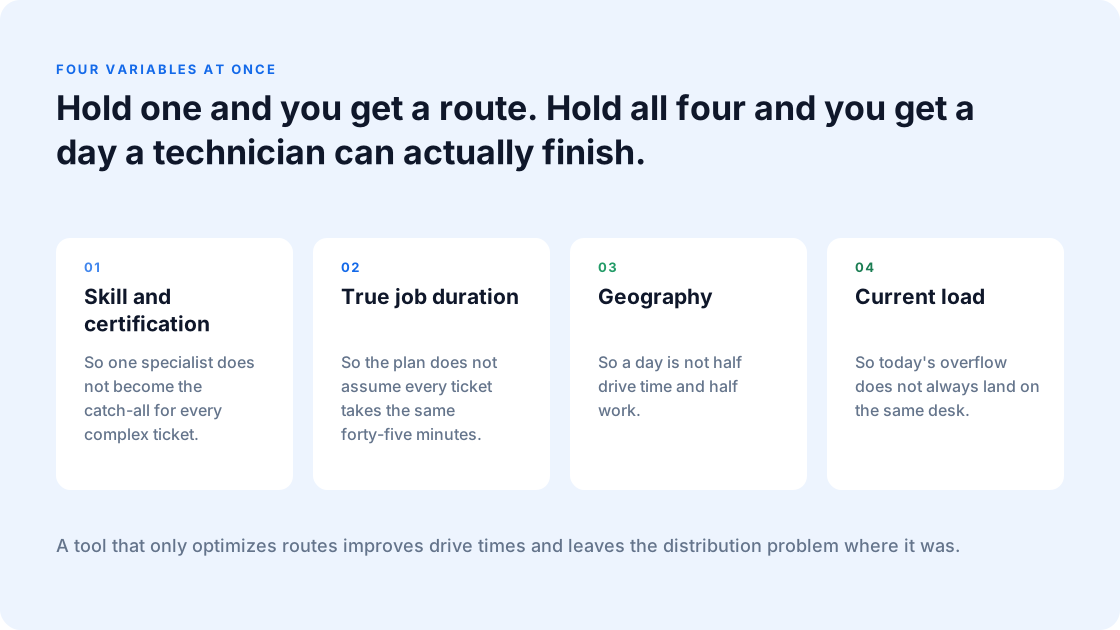
A calendar tool tells you who is working. A dispatch board tells you who is assigned. Technician scheduling software decides who should be assigned by holding several variables at once that a person building a board by hand cannot:
- Skill and certification, so the right person gets the right job and one specialist does not become the catch-all for every complex ticket.
- True job duration, so the plan does not assume every ticket takes the same forty-five minutes.
- Geography, so a day is not half drive time and half work.
- Current load, so today’s overflow does not always land on the same desk.
Hold one of those and you get a route. Hold all four and you get a day that a technician can actually finish.
Why Hiring More Technicians Rarely Fixes an Overloaded Team
Hiring solves a shortage of hands. It does nothing for a schedule that concentrates the hardest, most fragmented days on the same few people. Bring a new technician into a manual dispatch process, and within a few weeks the same load imbalance reasserts itself. The most reliable techs still get the overflow, the emergency reroutes, and the jobs nobody else can close.
There is also a cost to hiring your way out. A new technician takes months to ramp on your properties, your systems, and your residents. In the meantime, the tenured people covering the gap are the exact people most at risk of leaving. You can grow the team and still lose ground.
The teams that stay healthy tend to be the ones where workload is planned so no single person quietly absorbs the slack.
What Burnout Costs a Maintenance Operation
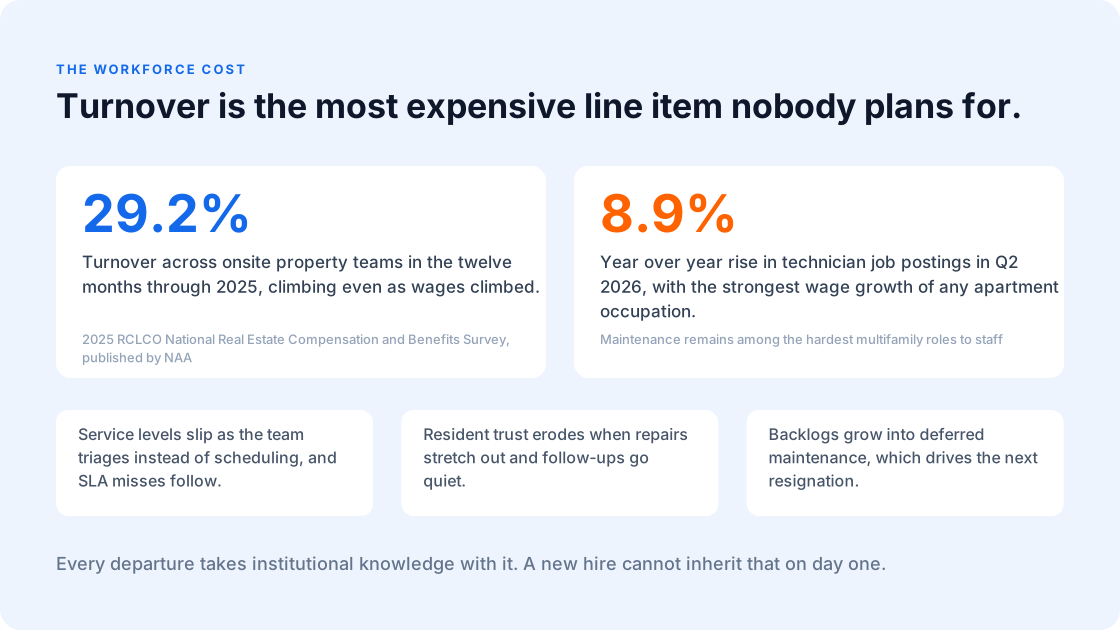
Turnover is the most expensive line item nobody plans for. Across onsite property teams it ran 29.2% in the twelve months through 2025, and it climbed even as wages climbed (2025 RCLCO National Real Estate Compensation and Benefits Survey, published by NAA). Maintenance is the hardest of those seats to keep filled.
Technician job postings rose 8.9% year over year in Q2 2026, technicians recorded the strongest wage growth of any apartment occupation, and the role remains among the most challenging in multifamily to staff. Every departure takes institutional knowledge with it: which units have the temperamental boilers, which residents need a heads-up before entry, which shortcuts are safe and which are not. A new hire cannot inherit that on day one.
The damage compounds beyond payroll:
- Coverage thins as the remaining team triages instead of scheduling, and response commitments start slipping.
- Resident trust erodes when repairs stretch out and follow-ups go quiet.
- Backlogs grow into deferred maintenance, which pushes the surviving technicians harder, which drives the next resignation.
For a fuller breakdown of how scheduling chaos shows up on the P&L, the hidden costs of scheduling across a portfolio sit alongside the workforce cost covered here.
How Uneven Workload Builds Up in a Manual Schedule
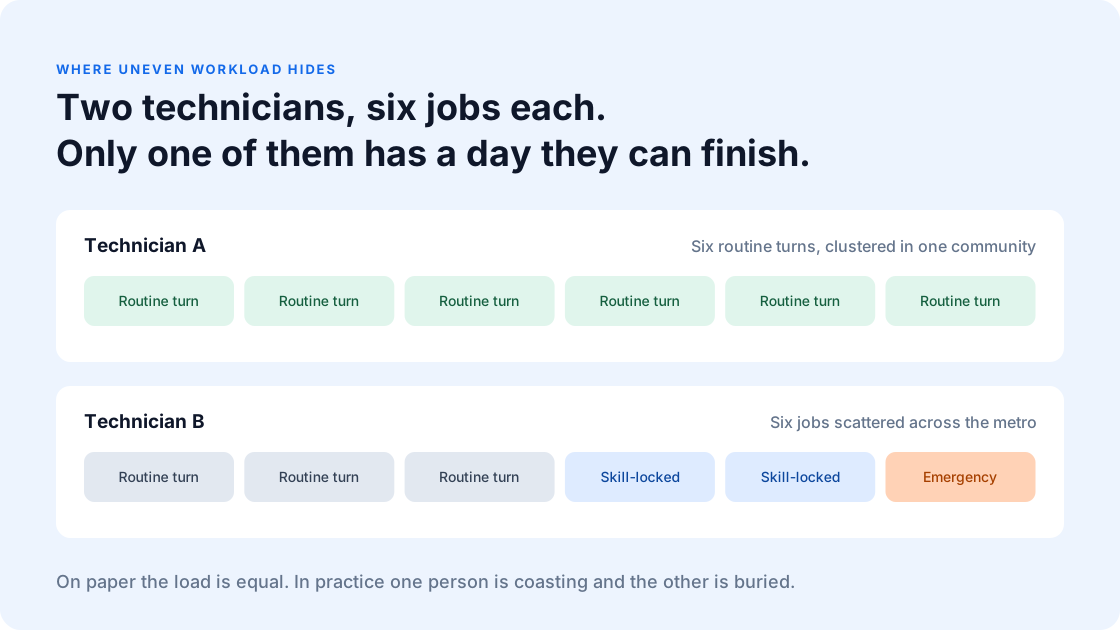
Two technicians can be assigned the same number of jobs and have completely different days. One gets six routine turns clustered in a single community. The other gets six jobs scattered across the metro, two of them requiring a skill only they hold, one of them an emergency that blows up the afternoon. On paper the load is equal. In practice one person is coasting and the other is buried.
Manual scheduling produces this drift constantly, because a dispatcher is solving for coverage in the moment. The urgent job goes to whoever picks up. The complex job goes to the person who always says yes. Each of those calls is reasonable on its own, and stacked across a quarter they produce a team where a few people are carrying days that quietly break them.
Concentration is what does the damage. Burnout collects wherever those variables pile onto one person, shift after shift.
What to Look For in Technician Scheduling Software
If you are evaluating tools, the workforce capabilities are the ones that separate a scheduler from a dispatch board:
- Balanced workload distribution: Assignments spread against each technician’s real capacity and skill set, so two people with the same job count also have comparable days.
- Predictive duration modeling: Historical job data used to estimate how long work will actually take, so the plan reflects a real day instead of an optimistic one.
- Real-time rebalancing: When a job runs long or an emergency lands, the disruption gets absorbed across the team instead of dumped on whoever answered first.
- Forecasted load per technician: Visibility into who is heading for an overloaded week before the week starts, which is the difference between managing capacity and reacting to it.
- Skill and certification matching: Assignment logic that knows who is qualified, so your one HVAC-certified tech is not the default for every ticket that mentions a thermostat.
A tool that only optimizes routes will make your drive times better and leave the distribution problem exactly where it was.
How Foresight Balances Technician Workload
This is where predictive scheduling earns its place, and it is a different job than routing. Foresight looks across the whole team and distributes work by capacity, skill, and location, so the day is built around what each technician can genuinely absorb.
Three things change when the schedule is built this way. Balanced workload distribution spreads assignments against each technician’s real capacity and skill set, so the specialist stops being the default catch-all and the newer hire is not left idle. Predictive scheduling uses historical job data to estimate how long work will actually take, so a plan reflects a real day. And when a job runs long or an emergency lands, Foresight rebalances in real time, so the disruption is absorbed across the team.
Routing and drive time matter too, and Foresight handles them, though that efficiency story is covered in how better scheduling saves time and fuel. The point here is narrower and more human. When the day is built around real capacity, the team stops running on adrenaline.
What Changes When the Workload Is Balanced
The operational payoff shows up quickly. Fewer emergency reroutes mean fewer blown afternoons. Even distribution means the tenured technicians stop absorbing everyone else’s overflow, which is the single biggest driver of the resignations that hurt most. Capacity that was lost to idle drive time and double-booked specialists comes back into the schedule, which relieves the backlog without a new hire.
Lula supports more than 9,000 maintenance Pros across 50-plus US markets and 350,000-plus properties, and the operations that scale without burning out their teams tend to share this trait: they treat the schedule as a workforce decision.
The Takeaway
When a maintenance team is drowning, the schedule is usually the lever. Uneven workload is what pushes good technicians out the door, and it is fixable without hiring. Technician scheduling software built around balanced workload distribution and predictive scheduling keeps the day sustainable, so the people you already have can do their best work and stay.
See how AI scheduling software for property maintenance balances your team’s workload, or explore Foresight to plan capacity before burnout sets in.
Technician Scheduling Software for Property Maintenance FAQs
How is technician scheduling software different from route optimization software?
Route optimization solves for travel, sequencing a set of already-assigned jobs into the most efficient path. Technician scheduling solves for assignment, deciding which person should take which job in the first place based on skill, capacity, and current load. A portfolio can have perfectly optimized routes and still have two technicians on the edge of quitting, because the routing layer never asked whether the assignment was fair.
Does technician scheduling software work with the property management system we already use?
It should, and integration depth is worth pressing on during evaluation. Lula connects with AppFolio, Buildium, Rent Manager, Propertyware, and Rentvine, so work orders flow in without anyone rekeying them. The question to ask any vendor is whether the integration is genuinely two-way, because a scheduler that reads work orders but cannot write status back leaves your team updating two systems all day.
How can I tell if my maintenance team is over capacity or just poorly scheduled?
Start with the spread across technicians. If a few consistently log overtime and emergency reroutes while others finish early, the problem is distribution. If everyone is maxed out with a growing backlog even after routes are balanced, that points to genuine capacity. Predictive scheduling makes the difference visible by showing forecasted load per technician before the day starts.
Will predictive scheduling reduce the number of technicians I need?
Usually no, and that is rarely the goal. It recovers capacity that was lost to idle drive time, double-booked specialists, and reactive rescheduling, which often means the team you have can clear more work without overtime. Whether that changes headcount depends on your portfolio’s growth.
How quickly does balanced scheduling affect retention?
Retention is a lagging signal, so it takes time to read. The leading indicators move faster. Overtime hours, emergency reroutes, and the gap between your busiest and least-busy technicians all tend to compress within the first scheduling cycles once the load is distributed by capacity rather than by habit.
Anything found written in this article was written solely for informational purposes. We advise that you receive professional advice if you plan to move forward with any of the information found. You agree that neither Lula or the author are liable for any damages that arise from the use of the information found within this article
